Wednesday, November 05, 2008

.NET Framework 4.0 Types and Namespaces

Along with all this new features found in Visual Studio 2010, there will be some new types and namespaces available in .NET Framework 4.0.

A .NET Framework 4.0 Poster is available for the ultimate way of viewing such types and namespaces.

PDC2008-NETFX4

I uploaded the poster in a large size to be available for downloading.

Of course they are subject to change as things are still at a very early stage but it's great to be on track ...

Thursday, October 30, 2008

Windows Azure Tools for Microsoft Visual Studio October 2008 CTP Available Now !

Windows Azure Tools for Microsoft Visual Studio October 2008 CTP is now available for download from Microsoft Download Center

Windows Azure Tools for Microsoft Visual Studio extend Visual Studio to enable the creation, building, debugging, running and packaging of scalable services on Windows Azure.

Windows Azure Tools for Microsoft Visual Studio includes:
  • C# and VB Project templates for building Cloud Services
  • Integration with the Development Fabric and Development Storage services
  • Debugging Cloud Service Roles running in the Development Fabric
  • Building and packaging of Cloud Service Packages
  • Browsing to the Azure Services Developer Portal
  • Role configuration
  • SSL Certificate selection

Wednesday, October 29, 2008

VSTS 2010 Architecture Explorer

Today I finally started playing around with VSTS 2010 CTP and started get a feel of the new wonders …

This should be the first post of a series of VSTS 2010 posts out of experiencing the upcoming release …

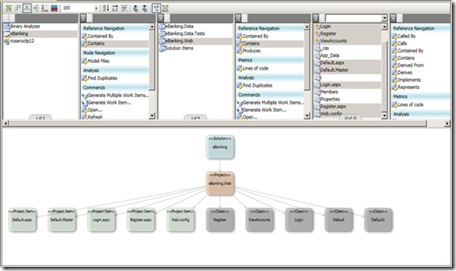
My first experience was with the Architecture Explorer, this great new feature of the Architecture Edition, it is a WPF interface for exploring your architecture. It allows you to drill through all of the projects, classes, methods, code metrics, relationships and just about anything else you can think of …
listingsID_341_levinson0418_1

The above shows a basic view of the Architecture Explorer. The lists at the top let you select which objects show up on the design surface. At this point, the design surface is a read-only and all navigation is done via the lists.

If you look closely, you can see that for each object (solution, project, class, etc.) you can select items contained within, objects which contain the object and objects/methods which are called by the object. You can also see which interfaces are implemented by an object, run code metrics on an object and perform various other pieces of analysis. The resulting views on the design surface can be saved as .XPS files and distributed.

The design surface also allows you to view the information in different ways. The different views are as follows:

  • The Dependency Matrix View
    • The nodes appear in a matrix and dependencies between nodes are indicated at intersections of the matrix.
  • The Vertical Tree View
    • Nodes appear from top to bottom in order of most dependent to least dependent.
  • The Horizontal Tree View
    • Nodes appear from left to right in order of most dependent to least dependent.
  • The Stack View
    • Nodes appear from top to bottom in order of highest-level to lowest-level.
  • The Nested Stack View
    • Nodes appear as nested nodes with higher-level nodes that contain lower-level nodes.
  • The Force Directed Layout
    • Nodes appear as clusters or hubs with most dependent nodes near the center of the clusters and the least dependent nodes appearing at the outer edges of the clusters.

VSTS 2008 Database Edition GDR RC1 is now available

Gert Drapers has just announced that VSTS 2008 Database Edition GDR Release Candidate 1 is now available for download from Microsoft Download Center.

This version will provide an upgrade path to the RTM so it worth trying out …

The documentation as well is available for downloading.

Tuesday, October 28, 2008

Visual Studio 2010 and .NET Framework 4.0 CTP & Feedback

Visual Studio 2010 CTP is now available for download on Microsoft Connect along with Visual Studio 2010 and .NET Framework 4.0 CTP Feedback page that is very helpful.

Visual Studio 2010 and .NET Framework 4.0 mark the next generation of developer tools from Microsoft. Designed to address the latest needs of developers, Visual Studio delivers key innovations in the following pillars: Democratizing Application Lifecycle Management, Enabling emerging trends, Inspiring developer delight and Riding the next generation platform wave. For more information, check out the Overview of Visual Studio 2010 and .NET Framework 4.0

Sunday, October 26, 2008

Team Foundation Build Load Balancer

A new project is released on CodePlex called Team Foundation Build Load Balancer that balances builds between the build agents defined in a Team Project and thus reducing the time developer's wait for builds to complete.

It’s a very simple command-line application that is designed to run in a scheduled job to balance queued builds between multiple build agents irrespective of which build agent it was queued on.