Today I finally started playing around with VSTS 2010 CTP and started get a feel of the new wonders …
This should be the first post of a series of VSTS 2010 posts out of experiencing the upcoming release …
My first experience was with the Architecture Explorer, this great new feature of the Architecture Edition, it is a WPF interface for exploring your architecture. It allows you to drill through all of the projects, classes, methods, code metrics, relationships and just about anything else you can think of …
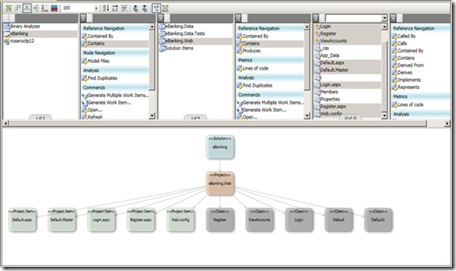
The above shows a basic view of the Architecture Explorer. The lists at the top let you select which objects show up on the design surface. At this point, the design surface is a read-only and all navigation is done via the lists.
If you look closely, you can see that for each object (solution, project, class, etc.) you can select items contained within, objects which contain the object and objects/methods which are called by the object. You can also see which interfaces are implemented by an object, run code metrics on an object and perform various other pieces of analysis. The resulting views on the design surface can be saved as .XPS files and distributed.
The design surface also allows you to view the information in different ways. The different views are as follows:
- The Dependency Matrix View
- The nodes appear in a matrix and dependencies between nodes are indicated at intersections of the matrix.
- The Vertical Tree View
- Nodes appear from top to bottom in order of most dependent to least dependent.
- The Horizontal Tree View
- Nodes appear from left to right in order of most dependent to least dependent.
- The Stack View
- Nodes appear from top to bottom in order of highest-level to lowest-level.
- The Nested Stack View
- Nodes appear as nested nodes with higher-level nodes that contain lower-level nodes.
- The Force Directed Layout
- Nodes appear as clusters or hubs with most dependent nodes near the center of the clusters and the least dependent nodes appearing at the outer edges of the clusters.


